
Select Location
Select Language
Lead Generator
Reference Links
App Options
Lead Generator
Reference Links
App Options
Générateur de pistes de vente
Liens de référence
Options de app
Follow the steps to enter a SendSuite® sales lead into Siebel.
Look Around. What Do You See?
How Do They Ship?
Get to know your clients!
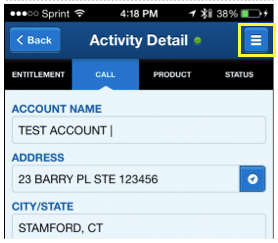
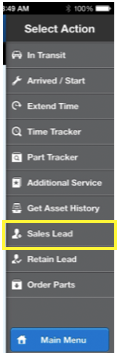
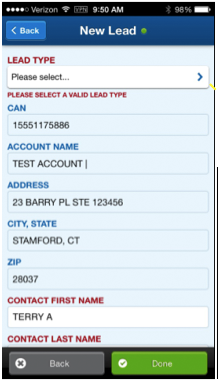
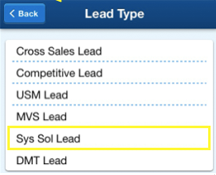
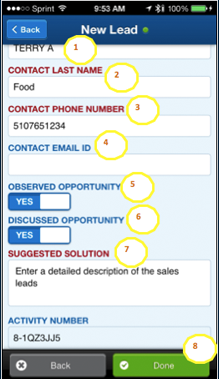
The Sales Lead tool displays. It will be populated with the customer´s information from the Activity. Select Sys Sol Lead from the LEAD TYPE field.
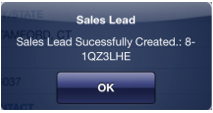
A Sale Lead dialog box displays stating the sales lead successfully created. Click OK to continue.
- Colleges and universities, hospitals, office complexes, courthouses
- Can I ask you a few questions about your mailroom operations?
- Ask the following:
- How many mailrooms?
- Where are they?
- Do they function independently or work together?
- Did you know that Pitney has software that can help you streamline your mailroom processes and save you money. You can even keep your contracts with your carriers.
- Would you like a PB rep to call you with more information?
- Secret Code: 7531
- Colleges and universities, hospitals, office complexes, courthouses
- I see you ship parcels/small freight. Can I ask you a few questions?
-
- Do you use only one carrier or a few different ones?
- Do you have negotiated rates?
- Did you know Pitney Bowes can also help you ship parcels/small freight as well as metered mail?
- Did you know that beginning in 2015, the USPS is going to require an Intelligent Mail Parcel Barcode to continue receiving your commercial based shipping discount? We have a product that can help you with that.
- This same product will also provide you with multiple options for shipping your parcels/small freight, including the USPS, UPS, FedEx and others.
- Would you like a PB rep to call you with more information?
- Colleges and universities, hospitals, large office complexes
- I see you have a loading dock. Can I ask you a few questions?
-
- Do you use only one carrier or a few different ones?
- Do you have negotiated rates?
- Do you ship both parcels and freight?
- Did you know that Pitney Bowes can help you ship parcels as well as freight filling less than a truckload?
- Did you know that beginning in 2015, the USPS is going to require an Intelligent Mail Parcel Barcode to continue receiving your commercial based shipping discount? We have a product that can help you with that.
- This same product will also provide you with multiple options for shipping your parcels, including the USPS, UPS, FedEx and others.
- Would you like a PB rep to call you with more information?
- Anyone who has a meter
- I saw on the meter strip that you ship a lot of large envelopes/parcels. Is the USPS the only carrier you use to ship?
- Are you taking advantage of commercial based pricing or other USPS discounts?
- Did you know Pitney Bowes can also help you ship parcels as well as metered mail?
- Did you know that beginning in 2015, the USPS is going to require an Intelligent Mail Parcel Barcode to continue receiving your commercial based shipping discount? We have a product that can help you with that.
- This same product will also provide you with multiple options for shipping your parcels, including the USPS, UPS, FedEx and others.
- Would you like a PB rep to call you with more information?
- Courthouse, Finance, Insurance, Real Estate
- I see the certified green card. Do you still complete the certified mail process by hand?
- How many mailrooms?
- Where are they?
- Do they function independently or work together?
- How many people are processing certified mail?
- Did you know that PB has software that can automate the entire Return Receipt process? It helps you complete the forms and receive confirmation that the documents were received by your client. It even saves the electronic signature and can be used as proof that the client received the mail/parcel.
- Would you like a PB rep to call you with more information?
- Finance, Insurance, Real Estate
- I see you have presort tray. Can I ask you a few questions?
- Do you send Certified mail?
- What do you all use the trays for?
- Do you ship large envelopes/Small Parcels?
- Certified Mail: Did you know that PB has software that can automate the entire Return Receipt process? It helps you complete the forms and receive confirmation that the documents were received by your client. It even saves the electronic signature and can be used as proof that the client received the mail/parcel.
- Large Envelopes/Small Parcels: Did you know that PB has software that can save you money mailing large envelope/small parcel envelope mailings. It allows you to track the location of your mailing at any point in time and even provides that information to your customers.
- Would you like a PB rep to call you with more information?
- Secret Code: 1908
- Almost any location
- I just saw a (FedEx/UPS/USPS or other carriers) driver person. Can I ask you a few questions?
- Do you use only one carrier or a few different ones for outbound?
- Do you have a negotiated rate?
- How many people are allowed to ship in your office?
- Did you know that Pitney has software that can help you streamline your parcel shipping. It even provides reports to show how your carriers are performing so that you can put processes in place to save money.
- Would you like a PB rep to call you with more information?
- Secret Code: 6294
Look Around. What Do You See?
How Do They Ship?
Get to know your clients!
- Colleges and universities, hospitals, office complexes, courthouses
- Can I ask you a few questions about your mailroom operations?
- Ask the following:
- How many mailrooms?
- Where are they?
- Do they function independently or work together?
- Did you know that Pitney has software that can help you streamline your mailroom processes and save you money. You can even keep your contracts with your carriers.
- Would you like a PB rep to call you with more information?
- Secret Code: 7531
- Colleges and universities, hospitals, office complexes, courthouses
- I see you ship parcels/small freight. Can I ask you a few questions?
-
- Do you use only one carrier or a few different ones?
- Do you have negotiated rates?
- Did you know Pitney Bowes can also help you ship parcels/small freight as well as metered mail?
- Did you know that beginning in 2015, the USPS is going to require an Intelligent Mail Parcel Barcode to continue receiving your commercial based shipping discount? We have a product that can help you with that.
- This same product will also provide you with multiple options for shipping your parcels/small freight, including the USPS, UPS, FedEx and others.
- Would you like a PB rep to call you with more information?
- Colleges and universities, hospitals, large office complexes
- I see you have a loading dock. Can I ask you a few questions?
-
- Do you use only one carrier or a few different ones?
- Do you have negotiated rates?
- Do you ship both parcels and freight?
- Did you know that Pitney Bowes can help you ship parcels as well as freight filling less than a truckload?
- Did you know that beginning in 2015, the USPS is going to require an Intelligent Mail Parcel Barcode to continue receiving your commercial based shipping discount? We have a product that can help you with that.
- This same product will also provide you with multiple options for shipping your parcels, including the USPS, UPS, FedEx and others.
- Would you like a PB rep to call you with more information?
- Anyone who has a meter
- I saw on the meter strip that you ship a lot of large envelopes/parcels. Is the USPS the only carrier you use to ship?
- Are you taking advantage of commercial based pricing or other USPS discounts?
- Did you know Pitney Bowes can also help you ship parcels as well as metered mail?
- Did you know that beginning in 2015, the USPS is going to require an Intelligent Mail Parcel Barcode to continue receiving your commercial based shipping discount? We have a product that can help you with that.
- This same product will also provide you with multiple options for shipping your parcels, including the USPS, UPS, FedEx and others.
- Would you like a PB rep to call you with more information?
- Courthouse, Finance, Insurance, Real Estate
- I see the certified green card. Do you still complete the certified mail process by hand?
- How many mailrooms?
- Where are they?
- Do they function independently or work together?
- How many people are processing certified mail?
- Did you know that PB has software that can automate the entire Return Receipt process? It helps you complete the forms and receive confirmation that the documents were received by your client. It even saves the electronic signature and can be used as proof that the client received the mail/parcel.
- Would you like a PB rep to call you with more information?
- Finance, Insurance, Real Estate
- I see you have presort tray. Can I ask you a few questions?
- Do you send Certified mail?
- What do you all use the trays for?
- Do you ship large envelopes/Small Parcels?
- Certified Mail: Did you know that PB has software that can automate the entire Return Receipt process? It helps you complete the forms and receive confirmation that the documents were received by your client. It even saves the electronic signature and can be used as proof that the client received the mail/parcel.
- Large Envelopes/Small Parcels: Did you know that PB has software that can save you money mailing large envelope/small parcel envelope mailings. It allows you to track the location of your mailing at any point in time and even provides that information to your customers.
- Would you like a PB rep to call you with more information?
- Secret Code: 1908
- Almost any location
- I just saw a (FedEx/UPS/USPS or other carriers) driver person. Can I ask you a few questions?
- Do you use only one carrier or a few different ones for outbound?
- Do you have a negotiated rate?
- How many people are allowed to ship in your office?
- Did you know that Pitney has software that can help you streamline your parcel shipping. It even provides reports to show how your carriers are performing so that you can put processes in place to save money.
- Would you like a PB rep to call you with more information?
- Secret Code: 6294
Regardez autour de vous. Que voyez–vous?
Comment expédient–ils?
Apprenez à connaitre vos clients!
- Collèges et universités, hôpitaux, complexes de bureaux et palais de justice
- Puis–je vous poser quelques questions sur l’exploitation de votre salle de courrier?
- Posez les questions suivantes:
- Combien y a–t–il de salles de courrier?
- Où se trouvent–elles?
- Fonctionnent–elles de manière indépendante ou conjointe?
- Saviez–vous que Pitney Bowes propose un logiciel qui peut vous aider à rationaliser les processus de votre salle de courrier et à économiser de l’argent? Vous pouvez même conserver les contrats passés avec vos transporteurs.
- Aimeriez–vous qu’un représentant PB communique avec vous pour vous fournir davantage d’information?
- Code Secret: 7531
- Collèges et universités, hôpitaux, complexes de bureaux et palais de justice
- Je constate que vous expédiez des colis et des petites cargaisons. Puis–je vous poser quelques questions?
-
- Avez–vous toujours recours au même transporteur? En utilisez–vous des différents?
- Avez–vous négocié des tarifs?
- Saviez–vous que Pitney Bowes peut aussi vous aider à expédier des colis et des petites cargaisons, en plus du courrier traité par compteur?
- Le même produit vous propose plusieurs options pour l’expédition de colis et de petites cargaisons, y compris UPS, FedEx et d’autres transporteurs.
- Aimeriez–vous qu’un représentant PB communique avec vous pour vous fournir davantage d’information?
- Collèges et universités, hôpitaux, complexes de bureaux et palais de justice
- Je vois que vous disposez d’un quai de chargement. Puis–je vous poser quelques questions?
-
- Avez–vous toujours recours au même transporteur? En utilisez–vous des différents?
- Avez–vous négocié des tarifs?
- Expédiez–vous des colis et des marchandises?
- Saviez–vous que Pitney Bowes peut vous aider à expédier des colis et des marchandises en chargement partiel?
- Le même produit vous propose plusieurs options pour l’expédition de vos colis, y compris UPS, FedEx et d’autres transporteurs.
- Aimeriez–vous qu’un représentant PB communique avec vous pour vous fournir davantage d’information?
- Quiconque dispose d’un compteur
- J’ai vu sur la bande du compteur que vous expédiez beaucoup de grandes enveloppes et de colis. À quel(s) transporteur(s) faites–vous appel pour l’expédition?
- Tirez–vous profit des tarifs commerciaux ou d’autres réductions?
- Saviez–vous que Pitney Bowes peut aussi vous aider à expédier des colis, en plus du courrier traité par compteur?
- Le même produit vous propose plusieurs options pour l’expédition de vos colis, y compris UPS, FedEx et d’autres transporteurs.
- Aimeriez–vous qu’un représentant PB communique avec vous pour vous fournir davantage d’information?
- Courthouse, Finance, Insurance, Real Estate
- I see the certified green card. Do you still complete the certified mail process by hand?
- How many mailrooms?
- Where are they?
- Do they function independently or work together?
- How many people are processing certified mail?
- Did you know that PB has software that can automate the entire Return Receipt process? It helps you complete the forms and receive confirmation that the documents were received by your client. It even saves the electronic signature and can be used as proof that the client received the mail/parcel.
- Would you like a PB rep to call you with more information?
- Finances, assurance et immobilier
- Je vois que vous disposez d’un plateau pour tri préalable. Puis–je vous poser quelques questions?
- À quoi servent les plateaux?
- Expédiez–vous de grandes enveloppes ou de petits colis?
- Grandes enveloppes / petits colis: Saviez–vous que PB propose un logiciel qui peut vous permettre d’économiser lors de l’envoi de grandes enveloppes et de petits colis? Il permet de faire le suivi de l’endroit où se trouve votre envoi en tout temps, et fournit même cette information à vos clients
- Aimeriez–vous qu’un représentant PB communique avec vous pour vous fournir davantage d’information?
- Code Secret: 1908
- Presque tous les milieux
- Je viens de croiser un chauffeur de (FedEx/UPS ou tout autre transporteur). Puis–je vous poser quelques questions?
- Avez–vous toujours recours au même transporteur ou utilisez–vous les services de différents transporteurs pour l’expédition?
- Avez–vous négocié des tarifs?
- Dans votre bureau, combien de personnes peuvent–elles avoir recours aux services d’expédition?
- Saviez–vous que Pitney Bowes propose un logiciel qui peut vous aider à rationaliser l’expédition de colis? Il fournit même des rapports pour vous montrer le rendement de vos transporteurs. Vous pourrez ainsi adopter des processus pour économiser de l’argent.
- Aimeriez–vous qu’un représentant PB communique avec vous pour vous fournir davantage d’information?
- Code Secret: 6294